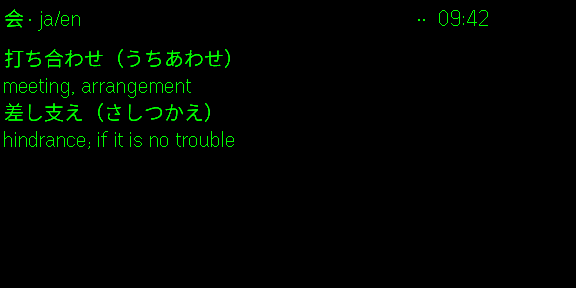
Conversation
New words appear as they are said, nothing else on the lens. A swipe shows the sentence translation instead (Premium).
 Kotolens
 listens through your glasses and shows the two or three words you missed, with their reading and meaning. The rest stays clear glass, and the person in front of you stays in view.
Free, offline, for Japanese, English, Korean and Chinese. Premium {monthly} a month adds five more languages, translation and review on the glasses.
Real lens capture. A conversation, a video and a lecture: only the words you missed appear.
A full translation on the lens is a crutch: you stop hearing the language and start reading English. Kotolens shows only what you would have missed, so the sentence stays yours.
Each context has its own layout and its own gestures. Pick one on the phone, then put the phone away.
New words appear as they are said, nothing else on the lens. A swipe shows the sentence translation instead (Premium).
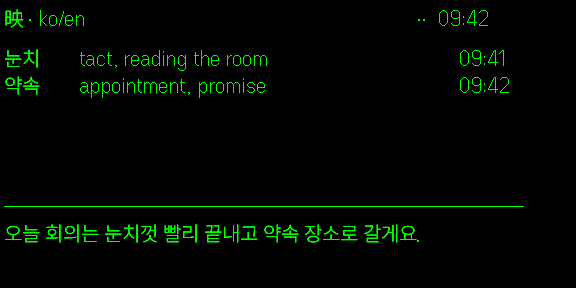
A fuller transcript, with the time or the reading in a side column. Pause-free: the words wait for you.
The transcript stays on the lens and new words are gathered quietly for the evening.
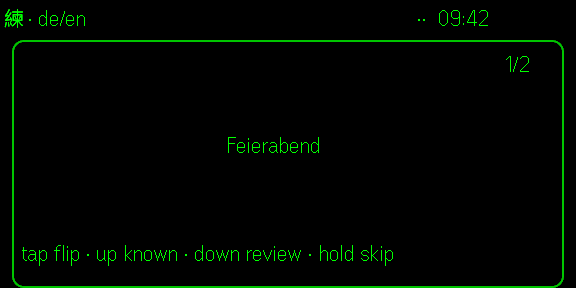
Your words as cards on the glasses. Tap to flip, swipe up if you know it, down to see it again.
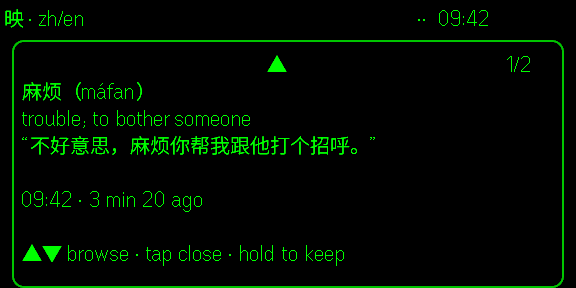
Every few minutes through the day, a word to review or a new one from the dictionary, with the sentence it was heard in.
Then, in the evening, every word that slipped by is waiting on the phone.
See the phone side →Recognition, dictionary and word extraction run on the phone for the first four. The interface speaks ten languages.
Dictionaries: JMdict, CC-CEDICT, Wiktionary. Definitions in English, and in the app's other languages with Premium.
Audio is sent to the recognition service only when you choose one of these languages. You are told before it happens.
Kotolens works without a subscription. Premium is there for the day you want translation, review on the glasses, or another language.
Kotolens lives inside the Even Realities app, in Even Hub. This site only explains it, and handles Premium.
The one paired with your G2. Tap the Even Hub tab at the bottom.
Or open this link on your phone.
Install, then let it download the speech model and dictionary once (about 150 MB on Wi-Fi).
Put the phone in your pocket. The lens does the rest. Gestures for each context are listed in Settings.
Tested on iPhone. Android should work and reports are welcome at contact@kotolens.com
I built Kotolens because I wanted my glasses to help me listen, not read for me. Every email gets read, and most feature requests end up in the app within a few weeks.